UPDATED OCTOBER 2026 | 6 LAPTOPS COMPARED | PRICES, SPECS AND BUYING GUIDE
Best Laptop Under 35000 in India: 6 Picks for Study, Office and Light Gaming
Rs 35,000 buys a laptop for study, office work, online classes and streaming, but laptop prices in India have risen sharply in 2026. Most Core i3, Core i5 and Ryzen laptops now cost Rs 37,000 to Rs 60,000. We compared new laptops listed on Amazon India on 21 October 2026 by processor, RAM, screen, battery, software and price, and picked five that fit the budget plus one that is worth stretching for. By Rajarajan, Tech and Gaming.
Quick Answer: Which Is the Best Laptop Under 35000?
The Acer Aspire 3 A325-45 with an Intel Pentium N6000 and 12GB RAM is the best laptop under 35000 for most people who need Windows. At about Rs 34,990 it gives you Windows 11, 12GB of RAM and a 256GB SSD on a 15.6-inch screen. If you mostly use the browser and Google apps, the ASUS Chromebook CX1405 has a sharper Full HD screen. If you want light gaming, stretch to the Acer Aspire 3 with Ryzen 3 5300U at about Rs 36,990.
- Best Windows laptop: Acer Aspire 3 A325-45, Pentium N6000, 12GB RAM (about Rs 34,990)
- Best Chromebook: ASUS Chromebook CX1405, 14-inch FHD, 8GB RAM
- Best with MS Office: Lenovo IdeaPad Slim 3, MS Office 2021 and 2-year warranty
- Best battery life: Primebook 3 Max, 60.3Wh battery, FHD screen (about Rs 33,990)
- Best value: Primebook 2 Max, 256GB storage (about Rs 29,989)
- Best for light gaming: Acer Aspire 3 A325-42, Ryzen 3 5300U (about Rs 36,990)
- Best for students: ASUS Chromebook CX1405 for Google Classroom, or Primebook 3 Max for all-day battery
Our Top 3 Picks at a Glance
BEST WINDOWS LAPTOP
Acer Aspire 3 (Pentium N6000)

12GB RAM and Windows 11 on a 15.6-inch screen for about Rs 34,990.
BEST BATTERY LIFE
Primebook 3 Max

Full HD 15.6-inch IPS screen, backlit keyboard and a 60.3Wh battery. About Rs 33,990.
BEST FOR LIGHT GAMING (RS 35K TO 38K)
Acer Aspire 3 (Ryzen 3 5300U)

The only pick here with a Ryzen chip and Radeon graphics for light games. About Rs 36,990.
Disclosure: some links on this page are Amazon affiliate links. If you buy through them, Getmyelectronic may earn a small commission at no extra cost to you. Prices and availability change, so always check the latest details on Amazon.
Want to know how we choose these laptops? Read How We Test to see how we check, research and rank every pick.
Laptops Under 35000: Side-by-Side Comparison
Swipe sideways on mobile to see every column.
| # | Laptop | Processor | RAM / Storage | Display | OS | Weight | Price (approx.) | Best for | Buy |
|---|---|---|---|---|---|---|---|---|---|
|
1 |
Acer Aspire 3 (Pentium N6000) |
Intel Pentium N6000 |
12GB LPDDR4X / 256GB SSD |
15.6-inch HD (1366×768) |
Windows 11 Home |
1.5 kg |
About Rs 34,990 |
Windows apps, study, office work |
|
|
2 |
ASUS Chromebook CX1405 |
Intel Processor N50 |
8GB LPDDR5 / 128GB eMMC |
14-inch FHD, 300 nits |
ChromeOS |
1.39 kg |
Under Rs 35,000 (check latest) |
Browsing, Google apps, online classes |
|
|
3 |
Lenovo IdeaPad Slim 3 |
Intel Celeron N4020 |
4GB DDR4 / 256GB SSD |
14-inch HD, 220 nits |
Windows 11 Home + MS Office 2021 |
1.5 kg |
About Rs 29,999 |
Basic office work with MS Office |
|
|
4 |
Primebook 3 Max |
MediaTek Genio 720 (octa-core) |
8GB LPDDR5 / 128GB UFS + microSD |
15.6-inch FHD IPS, 250 nits |
PrimeOS (Android + select Linux apps) |
Not listed |
About Rs 33,990 |
Long battery, students, Android apps |
|
|
5 |
Primebook 2 Max |
MediaTek Helio G99 (octa-core) |
8GB LPDDR4X / 256GB UFS + microSD |
15.6-inch FHD IPS |
PrimeOS 3.0 (Android 15) |
Not listed |
About Rs 29,989 |
Lowest price, more storage |
|
|
6 |
Acer Aspire 3 (Ryzen 3 5300U) |
AMD Ryzen 3 5300U |
8GB DDR4 (up to 32GB) / 256GB SSD |
15.6-inch FHD IPS |
Windows 11 Home |
1.79 kg |
About Rs 36,990 |
Light gaming, faster Windows work |
Prices are Amazon India listings checked on 21 October 2026. Prices and stock change often, and the same model name can come in different RAM and storage versions, so confirm the exact model number before you buy. Pick 6 is just above Rs 35,000.
Sale tip: prices on these listings often drop during Amazon festive and Diwali sales, and bank card offers can lower them further. Compare the sale price with the prices in this table, not with the MRP.
What the Numbers Say About Laptops Under 35000
- Prices have moved up in 2026 as memory got more expensive. Many Ryzen 5 and Core i5 laptops that used to sell near Rs 35,000 are now listed at Rs 55,000 to 69,000, or are out of stock (Amazon India, Flipkart and Smartprix listings, October 2026).
- Windows laptops here use entry-level chips (Pentium, Celeron). A Ryzen 3 or Core i3 starts at about Rs 37,000 on Amazon today.
- Full HD screens are easier to find on Chromebooks and Primebooks than on Windows laptops at this price.
- The Primebooks have the biggest batteries in this list at 60.3Wh.
- MRP discounts of 40 to 60% are common on these listings. Compare the selling price, not the discount.
How We Picked the Best Laptops Under 35000
This is a research-based comparison. We did not test these laptops hands-on. We searched Amazon India for new laptops (no refurbished units) priced between Rs 30,000 and Rs 35,000 that were in stock, then compared the official listing specs.
- Processor class and number of cores
- RAM and storage, including type (SSD, eMMC or UFS)
- Screen size, resolution and brightness
- Operating system and which apps it can run
- Battery size, weight and ports
- Price on Amazon India and buyer ratings
Three Kinds of Laptop You Can Buy for Rs 35,000
Windows laptop
Runs every Windows program, including MS Office desktop, Tally and most exam or coding software. At this budget the chips are entry level, so stick to study and office work. Picks: Acer Aspire 3 (Pentium N6000), Lenovo IdeaPad Slim 3, and the Acer Aspire 3 with Ryzen 3 if you can stretch. Full model details are on the official Acer India and Lenovo India websites.
Chromebook
Runs ChromeOS, Google’s simple operating system for web apps and Android apps. Fast to start, low maintenance and good for Google Classroom. It cannot install Windows software. Pick: ASUS Chromebook CX1405.
Android-based laptop (PrimeOS)
Runs Android apps in a laptop layout, with big batteries and Full HD screens for the money. Good for students and light work, but no Windows software. Picks: Primebook 3 Max and Primebook 2 Max.
6 Best Laptops Under 35000 in India: Detailed Reviews
BEST WINDOWS LAPTOP
1. Acer Aspire 3 A325-45 (Intel Pentium N6000, 12GB, 256GB SSD)
The Acer Aspire 3 A325-45 is the Windows laptop in this list that gets the most memory for the money. It pairs an Intel Pentium N6000 with 12GB of LPDDR4X RAM and a 256GB SSD, so Chrome with many tabs, Microsoft Office, Zoom classes and YouTube can run side by side without the slowdowns you get on 4GB or 8GB budget laptops. The 15.6-inch screen is HD (1366×768), not Full HD, so text looks softer than on the ASUS Chromebook or the Primebooks. Acer adds its BlueLight Shield setting for long study sessions. Ports include USB 3.0 and HDMI, so you can plug in a pen drive or connect a TV or monitor. Wi-Fi is 802.11ac. At 1.5 kg it is easy to carry to college or the office. The Pentium N6000 is an entry-level chip: it handles everyday work well but is not meant for video editing or modern games. Choose this one if you need full Windows software, such as Tally, MS Office or college exam apps, on a budget.
Key Specifications
- Processor: Intel Pentium N6000
- RAM: 12GB LPDDR4X
- Storage: 256GB SSD
- Display: 15.6-inch HD, 1366x768, Acer BlueLight Shield
- OS: Windows 11 Home
- Connectivity: Wi-Fi 802.11ac, USB 3.0, HDMI
- Weight: 1.5 kg
Pros
- 12GB RAM is rare at this price
- Full Windows 11, runs all Windows apps
- SSD for quick boot and app loading
- HDMI to connect a TV or monitor
Cons
- HD screen, not Full HD
- Entry-level processor, not for editing or modern games
- 256GB fills up quickly
Best for: Students and home users who need Windows software and lots of open tabs.
Price: About Rs 34,990 on Amazon India (21 October 2026).
BEST CHROMEBOOK
2. ASUS Chromebook CX1405 (2026) CX1405CTA-S60622 (Intel N50, 8GB, 128GB)
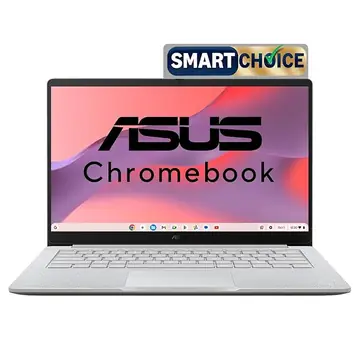
If most of your work happens in a browser, the ASUS Chromebook CX1405 is the lightest and simplest choice here. It runs ChromeOS, which boots fast, updates itself in the background and works well with Google Docs, Gmail, Google Classroom, YouTube and Android apps from the Play Store. The 14-inch Full HD (1920×1080) screen is anti-glare and rated at 300 nits, brighter than the HD panels on the Acer and Lenovo. Inside is an Intel Processor N50 (2 cores, up to 3.4 GHz) with 8GB of LPDDR5 RAM and 128GB of eMMC storage. You get one USB-A port, two USB-C ports that support charging and display output, HDMI 1.4 and Wi-Fi 6 with Bluetooth 5.4. ASUS lists a 42Wh battery. The 720p webcam has a privacy shutter. The key limit is software: ChromeOS cannot run Windows programs such as full MS Office desktop, Tally or most PC games, so check your apps before you buy.
Key Specifications
- Processor: Intel Processor N50, 2 cores, up to 3.4 GHz, 6MB cache
- RAM: 8GB LPDDR5
- Storage: 128GB eMMC
- Display: 14-inch FHD (1920x1080), 300 nits, anti-glare, 60Hz
- OS: ChromeOS
- Ports: 1x USB-A 3.2, 2x USB-C (display and charging), HDMI 1.4, audio jack
- Wireless: Wi-Fi 6, Bluetooth 5.4
- Battery: 42Wh
- Weight: 1.39 kg
Pros
- Full HD anti-glare screen
- Light at 1.39 kg
- Two USB-C ports with charging and display out
- Wi-Fi 6 and Bluetooth 5.4
Cons
- Cannot run Windows software
- 128GB eMMC is slower than an SSD
- Only 2 processor cores
Best for: School and college students who live in Google apps and the browser.
Price: Under Rs 35,000 on Amazon India (21 October 2026). Check the latest price.
BEST WITH MS OFFICE
3. Lenovo IdeaPad Slim 3 81WH007KIN (Intel Celeron N4020, 4GB, 256GB SSD)
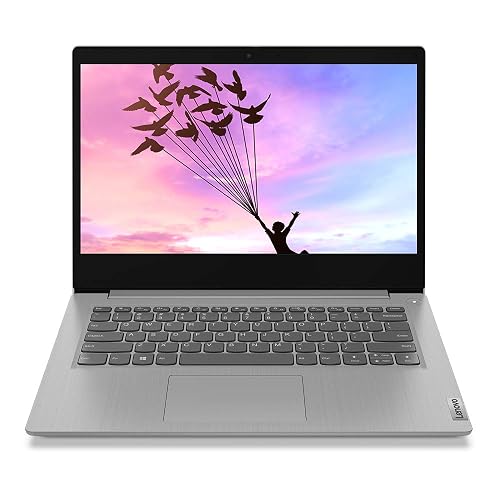
The Lenovo IdeaPad Slim 3 (81WH007KIN) is in this list for two reasons: it ships with MS Office Home and Student 2021 and a 2-year warranty, which together save you a fair amount of money. It runs Windows 11 Home on an Intel Celeron N4020 (2 cores, up to 2.8 GHz) with 4GB of DDR4 RAM and a 256GB SSD. The 14-inch screen is HD (1366×768) with an anti-glare finish and 220 nits of brightness. Lenovo rates the 35Wh battery at up to 10 hours. The body is 1.99 cm thin and weighs 1.5 kg, and you get a 720p webcam with a privacy shutter and two 1.5W speakers with Dolby Audio. Lenovo also includes a 3-month Xbox Game Pass Ultimate trial, but this laptop is not for gaming. The big weakness is 4GB of RAM: it is fine for Word, Excel and a few browser tabs, but heavy multitasking will slow it down. Buy it if MS Office and the longer warranty matter more to you than speed.
Key Specifications
- Processor: Intel Celeron N4020, 2 cores, 1.1 to 2.8 GHz, 4MB cache
- RAM: 4GB DDR4
- Storage: 256GB SSD
- Display: 14-inch HD (1366x768), 220 nits, anti-glare
- OS: Windows 11 Home, MS Office Home and Student 2021
- Battery: 35Wh, up to 10 hours (Lenovo claim)
- Audio: 2x 1.5W speakers, Dolby Audio
- Weight: 1.5 kg, 1.99 cm thin
- Warranty: 2 years
Pros
- MS Office Home and Student 2021 included
- 2-year warranty
- Privacy shutter on the webcam
- SSD storage
Cons
- Only 4GB RAM
- Slowest processor in this list
- HD screen
Best for: Parents, home offices and first-time users who mainly need MS Office.
Price: About Rs 29,999 on Amazon India (21 October 2026).
BEST BATTERY LIFE
4. Primebook 3 Max (2026) (MediaTek Genio 720, 8GB, 128GB)
The Primebook 3 Max is the newest model in this list and the one with the biggest battery. It runs PrimeOS, an Android-based laptop operating system that supports Android apps and select Linux apps such as VS Code, Cursor and WPS Office, inside a familiar desktop layout. Inside is a MediaTek Genio 720 octa-core chip that boosts up to 2.6 GHz, with 8GB of LPDDR5 RAM and 128GB of UFS storage, plus a microSD slot that takes cards up to 1TB. The 15.6-inch Full HD IPS screen is anti-glare at 250 nits and the hinge opens to 180 degrees. Primebook lists a 60.3Wh battery rated at up to 12 hours, with 36W fast charging. You also get a backlit keyboard, a numeric keypad and a metal cover. Primebook adds its PrimeAGNT AI assistant with 5,000 credits, and a paid PrimeX Cloud PC service for apps like Tally Prime. Like the Chromebook, it cannot run normal Windows programs or PC games.
Key Specifications
- Processor: MediaTek Genio 720, octa-core, up to 2.6 GHz
- RAM: 8GB LPDDR5
- Storage: 128GB UFS, microSD up to 1TB
- Display: 15.6-inch FHD IPS, 250 nits, anti-glare, 180-degree hinge
- OS: PrimeOS (Android + select Linux apps)
- Battery: 60.3Wh, up to 12 hours, 36W fast charging (Primebook claim)
- Keyboard: backlit, with numeric keypad
Pros
- Biggest battery in this list
- Full HD IPS screen
- Backlit keyboard with number pad
- Storage expands by microSD
Cons
- No Windows software support
- Only 128GB built-in storage
- Some features need paid add-ons
Best for: Students who want all-day battery and a big screen for notes, classes and video.
Price: About Rs 33,990 on Amazon India (21 October 2026).
BEST VALUE
5. Primebook 2 Max (2026) (MediaTek Helio G99, 8GB, 256GB)

The Primebook 2 Max costs about Rs 4,000 less than the Primebook 3 Max and gives you double the built-in storage: 256GB of UFS, plus a microSD slot for cards up to 1TB. It runs PrimeOS 3.0 based on Android 15, with multi-window multitasking, a desktop-style file manager and full keyboard and trackpad support. The chip is a MediaTek Helio G99 (MT8781) octa-core running up to 2.2 GHz, with 8GB of LPDDR4X RAM. It is a step below the Genio 720 in the 3 Max, but fine for browsing, documents, online classes and streaming. The 15.6-inch Full HD IPS screen, 60.3Wh battery rated at up to 12 hours, backlit keyboard, dual speakers and dual microphones match what students need for daily study. As with the other non-Windows models, check that your college or office apps work on Android before you buy.
Key Specifications
- Processor: MediaTek Helio G99 (MT8781), octa-core, up to 2.2 GHz
- RAM: 8GB LPDDR4X
- Storage: 256GB UFS, microSD up to 1TB
- Display: 15.6-inch FHD IPS
- OS: PrimeOS 3.0 (Android 15)
- Battery: 60.3Wh, up to 12 hours (Primebook claim)
- Audio: dual stereo speakers, dual microphones
- Keyboard: backlit, with numeric keypad
Pros
- Lowest price in this list
- 256GB storage plus microSD
- Up to 12 hours battery (claimed)
- Large Full HD screen
Cons
- No Windows software support
- Older chip than the Primebook 3 Max
- Android apps are not always laptop-friendly
Best for: Buyers on the tightest budget who want a big screen and long battery.
Price: About Rs 29,989 on Amazon India (21 October 2026).
BEST FOR LIGHT GAMING (RS 35K TO 38K)
6. Acer Aspire 3 A325-42 (AMD Ryzen 3 5300U, 8GB, 256GB SSD)
If you can stretch about Rs 2,000 past Rs 35,000, the Acer Aspire 3 A325-42 is the most capable laptop in this guide. Its AMD Ryzen 3 5300U has 4 cores running from 2.6 GHz up to 3.8 GHz, a clear step up from the Pentium, Celeron and Intel N50 chips above, and its integrated AMD Radeon graphics can handle light games such as Valorant, CS2, Minecraft and older titles at low settings and 720p or 1080p. The 8GB of DDR4 RAM runs in dual channel and can be upgraded up to 32GB, which helps both games and multitasking. Storage is a 256GB PCIe Gen3 SSD. The 15.6-inch Full HD IPS display has Acer ComfyView and covers 45% NTSC, so colours are plain but text is sharp. It runs Windows 11 Home with MS Office preinstalled. At 1.79 kg it is heavier than the others. This is still not a gaming laptop with a dedicated graphics card: those start at around Rs 70,000 in India right now.
Key Specifications
- Processor: AMD Ryzen 3 5300U, 4 cores, 2.6 to 3.8 GHz, 4MB L3 cache
- Graphics: AMD Radeon (integrated)
- RAM: 8GB DDR4, dual channel, upgradable to 32GB
- Storage: 256GB PCIe Gen3 SSD
- Display: 15.6-inch FHD IPS (1920x1080), 45% NTSC
- OS: Windows 11 Home, MS Office preinstalled
- Ports: USB 3.0, USB Type-C, HDMI
- Weight: 1.79 kg
Pros
- Fastest processor in this guide
- Radeon graphics for light gaming
- RAM upgradable to 32GB
- Full HD IPS screen
Cons
- About Rs 2,000 over the Rs 35,000 budget
- Heaviest laptop here at 1.79 kg
- 256GB SSD
Best for: Students and casual gamers who want the best Windows performance near Rs 35,000.
Price: About Rs 36,990 on Amazon India (21 October 2026).
Can You Game on a Laptop Under 35000?
Gaming has spread far beyond big PCs and consoles, and many people now play on phones and light laptops. But be clear about what Rs 35,000 buys in 2026: none of these laptops has a dedicated graphics card. In India, the cheapest new laptops with an RTX 3050 or similar card start at around Rs 70,000.

What you can do at this price is light gaming. The Acer Aspire 3 with Ryzen 3 5300U and Radeon graphics can run esports and older games such as Valorant, CS2, Minecraft and GTA V at low settings. The Pentium, Celeron and Intel N50 laptops are best kept to browser games and cloud gaming services. The Primebooks and the Chromebook can run Android games from the Play Store, not PC games. If gaming is your main reason to buy, plan for a higher budget and a laptop with a dedicated graphics card. Our best gaming laptops under 1 lakh guide compares RTX 3050, RTX 4050 and RTX 5050 laptops. For RTX 5060 and RTX 4070 power, see our gaming laptops under 2 lakh guide.
Laptop Under 35000 with i5 or 16GB RAM: Is It Possible in 2026?
Not as a new laptop. When we checked Amazon India and Flipkart in October 2026, new Core i5 and Ryzen 5 laptops with 16GB RAM were listed well above Rs 35,000. For example, the HP 15 (fc0690AU) with a Ryzen 5 7520U and 16GB RAM was listed at Rs 68,998 on Flipkart, and the Acer Aspire Lite (AL15-52) with a Core i3-1215U and 16GB RAM at Rs 56,198. Here is what to do instead:
- Most "i5 laptop under 35000" results are refurbished, older generation or out of stock. We list only new laptops that are in stock.
- Need more RAM now? The Acer Aspire 3 A325-45 (pick 1) has 12GB, the most of the Windows picks here.
- Want to upgrade later? The Acer Aspire 3 A325-42 (pick 6) has 8GB DDR4 that can be upgraded to 32GB, so you can add a RAM stick when you can afford it.
- Need a Core i5 or Ryzen 5 for coding, editing or heavy Tally files? Plan for a budget of about Rs 55,000 or more.
Buying Guide: How to Choose a Laptop Under 35000
1. Pick the operating system first
Make a list of the apps you must use. If any of them is Windows-only, such as Tally, MS Office desktop or exam software, buy a Windows laptop. If you live in Chrome and Google apps, a Chromebook or Primebook gives you a better screen and battery for the money.
2. Get 8GB RAM or more if you can
RAM decides how many apps and tabs stay open without slowing down. 4GB is the bare minimum for Windows 11, as listed in Microsoft’s Windows 11 system requirements. 8GB is comfortable and 12GB, as on the Acer Aspire 3 A325-45, gives more room.
3. Prefer an SSD over eMMC
An SSD makes boot-up and app loading much faster than an old hard disk. eMMC and UFS storage on Chromebooks and Primebooks is fine for their apps but slower than an SSD for big files.
4. Check screen resolution and brightness
Full HD (1920×1080) looks much sharper than HD (1366×768), especially on 15.6-inch screens. For use near a window or outdoors, look for 250 nits or more.
5. Look at battery, weight and warranty
If you carry the laptop to college every day, a lighter body and bigger battery matter. A longer warranty, like the 2 years on the Lenovo IdeaPad Slim 3, is worth having on a budget laptop.
Which Laptop Under 35000 Should You Buy?
- I need Windows and many tabs open: Acer Aspire 3 A325-45 (Pentium N6000, 12GB)
- I use Google Classroom and the browser: ASUS Chromebook CX1405
- I mainly need MS Office: Lenovo IdeaPad Slim 3 (Office 2021 included)
- I want the longest battery life: Primebook 3 Max
- I want to spend under Rs 30,000: Primebook 2 Max
- I want to play light games: Acer Aspire 3 A325-42 (Ryzen 3 5300U), just above budget
Care Tips for a Laptop in This Price Range
Budget laptops keep costs low by using simpler materials, so a little care goes a long way in keeping them running for years.

- Wipe the screen with a soft dry cloth once a month
- Keep dust, food and water away from the keyboard and vents
- Install system updates and do not delete drivers you do not recognise
- Use a surge protector or UPS where power cuts and voltage swings are common
- Do not leave the laptop charging in a hot place, and keep the vents clear while it charges
- Keep at least 20GB of storage free so the laptop does not slow down
Frequently Asked Questions About Laptops Under 35000
Which is the best laptop under 35000 in India?
For most people who need Windows, the Acer Aspire 3 A325-45 with an Intel Pentium N6000, 12GB RAM and a 256GB SSD is the best pick at about Rs 34,990. If you only need the browser and Google apps, the ASUS Chromebook CX1405 is a good alternative with a Full HD screen.
Can I buy a gaming laptop under 35000?
Not a real one. New laptops with a dedicated graphics card start at around Rs 70,000 in India in 2026. For light games, the Acer Aspire 3 with Ryzen 3 5300U and Radeon graphics at about Rs 36,990 is the closest option.
Is 4GB RAM enough for a laptop in 2026?
Only for basic use like MS Office and a few browser tabs. For smoother multitasking, choose 8GB or more. The Acer Aspire 3 A325-45 in this list has 12GB.
Chromebook or Windows laptop under 35000: which is better?
It depends on your apps. Chromebooks are fast, simple and usually have better screens at this price, but they cannot run Windows software. If you need Tally, MS Office desktop or exam software, buy a Windows laptop.
What is a Primebook and can it replace a laptop?
Primebook makes laptops that run PrimeOS, an Android-based operating system. They are good for study, browsing, documents and video, with big batteries. They cannot run Windows programs or PC games.
Which laptop under 35000 comes with MS Office?
The Lenovo IdeaPad Slim 3 (81WH007KIN) includes MS Office Home and Student 2021. The Acer Aspire 3 A325-42 with Ryzen 3 also lists MS Office as preinstalled.
Can I upgrade the RAM on these laptops?
The Acer Aspire 3 A325-42 supports up to 32GB. Laptops with LPDDR4X or LPDDR5 memory, such as the Acer A325-45, the ASUS Chromebook and the Primebooks, usually have RAM fixed to the board, so buy the RAM you need on day one.
Our Verdict
Rs 35,000 does not buy a fast laptop in 2026, but it does buy a good one for study and office work. Pick the Acer Aspire 3 A325-45 if you need Windows, the ASUS Chromebook CX1405 if you live in the browser, and a Primebook if battery life and screen size matter most. If you can stretch to about Rs 37,000, the Acer Aspire 3 with Ryzen 3 5300U is the best all-rounder and the only one here that handles light games.
Getmyelectronic is a buying guide for laptops, monitors, graphics cards and gaming PC accessories in India. The guides are written by Rajarajan, a gamer and PC hardware enthusiast. The aim is simple: help you pick the right product for your budget and your use, without the marketing noise
nice blog
Very informative & helpful article.